
Download TumblRipper – Tumblr backup, image downloader, photo backup tool, free Tumblr tool, photoblog backup, offline Tumblr images
Overview
TumblRipper is a lightweight, free utility designed to help users back up images from Tumblr blogs directly to their local storage. The application targets individuals who maintain or follow photoblogs and wish to preserve visual content offline. Its primary function is to streamline the process of downloading all images from a specified Tumblr blog, ensuring that valuable visual data is not lost due to platform changes, blog deletions, or server outages. The tool is particularly useful for content curators, digital archivists, and enthusiasts who rely on Tumblr’s visual content for inspiration or personal collections.
Although the developer did not provide additional background on the team or organization behind TumblRipper, the app’s longevity since its release in 2012 suggests a stable and functional design. The tool operates without installation, making it accessible across various Windows environments without administrative privileges. Real-world use cases include backing up favorite artists’ portfolios, preserving memories from personal blogs, or archiving trending visual content before it disappears. In the broader app ecosystem, TumblRipper fills a niche for users seeking simple, efficient, and non-intrusive tools for content preservation.
Key Features & Functionality
- No Installation Required: TumblRipper is a stand-alone application, allowing users to run it immediately after downloading. This eliminates the need for setup, system modifications, or registry changes, ideal for users seeking a quick, hassle-free solution.
- Automatic Photo Download: The tool automatically scans and downloads all images from a specified Tumblr blog, removing the need for manual selection. This ensures comprehensive backups and reduces the risk of missing content.
- Retrieval of Multiple Resolutions: TumblRipper attempts to download images at multiple resolutions, prioritizing the highest available—such as 1280px—while falling back to 500px, 250px, or smaller if needed. This flexibility supports both high-quality preservation and efficient storage use.
- Low Server Load: Designed to minimize impact on Tumblr’s servers, the tool operates with efficiency and consideration. It avoids overwhelming the platform, making it a responsible choice for bulk downloading.
- Preservation of Original Dates: Each downloaded image retains its original upload date as metadata, enabling chronological organization. This feature enhances usability for archiving and content management.
For example, a user following a photography blog can use TumblRipper to download an entire archive with preserved timestamps, creating a personal digital gallery. The automatic resolution selection ensures that high-quality images are saved when available, while lower resolutions conserve disk space when necessary.
Interface, UX & Performance
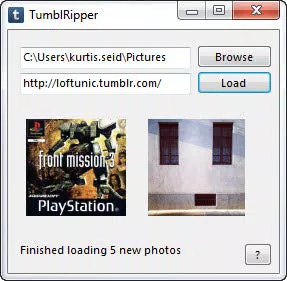
The user interface of TumblRipper is minimalistic and focused on functionality, reflecting its utility-driven purpose. It likely features a clean layout with input fields for the Tumblr blog URL, progress indicators, and basic control buttons. Navigation is straightforward: users enter a blog address, initiate the download, and monitor the process in real time. The design avoids unnecessary visual clutter, prioritizing ease of use over aesthetic flair.
Although the developer did not list formal performance metrics, the tool’s small file size of 3.2 MB suggests efficient resource usage. It is expected to run smoothly on a wide range of Windows systems, including older or low-spec devices. Responsiveness is likely consistent, given the absence of complex dependencies. Stability is implied by the app’s long-standing presence since 2012, though no formal testing data was provided. Users can expect reliable operation for standard backup tasks without frequent crashes or freezes.
Platform Compatibility & Technical Requirements
TumblRipper is designed for the Windows platform and operates as a standalone executable. The software version is 2.0, with a file size of 3.2 MB. The developer did not specify minimum OS requirements or compatibility details beyond the platform. As such, users should exercise caution when running the tool on newer Windows versions, especially if no official compatibility statement exists. The lack of installation means it can be used on systems without admin rights, but potential issues may arise with security software blocking unsigned executables.
Compatibility with modern Windows environments remains uncertain without additional documentation. Users are advised to run the tool in a secure, isolated environment when possible, particularly when dealing with third-party utilities. The absence of a formal update history or version changelog limits insight into long-term maintenance, though the app’s continued availability suggests ongoing basic functionality.
Pros and Cons
Pros
- No installation required – immediate usability
- Automated bulk image downloading – saves time and effort
- Supports multiple image resolutions – balances quality and storage
- Minimal server impact – considerate of Tumblr’s infrastructure
- Preserves original upload dates – enhances archival value
Cons
- Platform limited to Windows – no support for macOS or Linux
- Developer did not provide OS compatibility details
- No official update history or changelog available
- Standalone executable may trigger antivirus warnings
- Not designed for mobile devices or cloud storage integration
FAQ
Is TumblRipper safe to download and use?
Yes, TumblRipper is a free, standalone tool that does not require installation. However, as with any third-party utility, users should download it from trusted sources and scan the file with antivirus software before running it.
Can I use TumblRipper on macOS or Linux?
Currently, TumblRipper is only available for Windows. There is no official support for macOS or Linux platforms.
Does TumblRipper work with private or password-protected Tumblr blogs?
The tool is designed for public blogs. It may not function properly with private or password-protected content, as it relies on direct access to publicly available image URLs.
How often should I update TumblRipper?
As the developer has not provided update logs or a changelog, it is unclear how frequently the app is maintained. Users should check the official source periodically for any new versions.
Can I back up multiple Tumblr blogs at once?
Based on available information, TumblRipper appears to process one blog at a time. Bulk processing across multiple blogs is not supported in the current version.
Final Thoughts
TumblRipper remains a reliable, no-frills solution for users seeking to back up Tumblr images locally. Its ability to download content at multiple resolutions, preserve metadata, and operate without installation makes it a valuable tool for digital archiving. While it lacks modern features like cloud sync or mobile access, its simplicity and focus on core functionality continue to serve its niche audience. The app is especially beneficial for photographers, bloggers, and collectors who value offline access to visual content. Despite its age, TumblRipper delivers consistent performance and remains a secure, efficient option for preserving Tumblr memories.
Download TumblRipper now


